

The gap
The ticket is real. The caller might not be.
Resets authenticate the account
Employee ID, voice, and security questions prove someone knows things about the worker — not that they are the worker. That gap is what social engineering exploits.
Deskless workers have no fallback
No corporate laptop, no badge reader at the phone, and authenticator apps that don't survive a personal-phone swap. The help desk becomes the identity check — with no tooling.
Post-mortems find it after access
Account-recovery abuse is discovered in the incident review, after credentials were handed over. Identity needs answering at the boundary, not afterwards.
What you can't see
Typical reset flows authenticate account knowledge. They do not verify the person on the phone — that's help-desk social engineering, and it's a ~30-second question Stile can answer.
The product
Built for how impersonation works now.
Two shifts at once: deepfake voices and synthetic IDs make impersonation cheap, and mobile driver's licenses make strong verification instant. The product is built for both.
Accepts the new standard
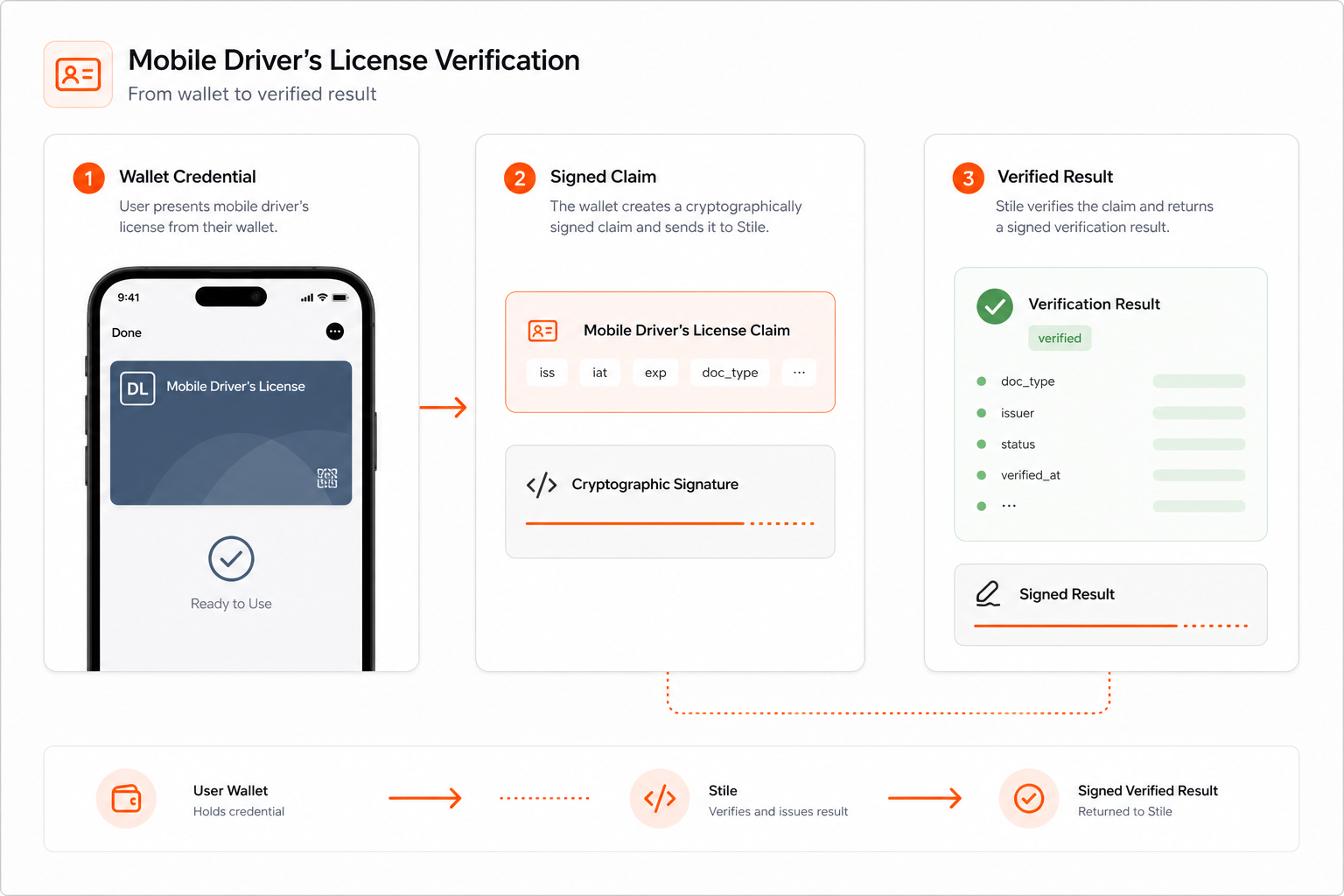
Native support for mobile driver's licenses — verified by cryptographic signature, not a photo. ISO/IEC 18013-5, with a physical-license scan as the always-available fallback.
Liveness and spoof checks
Models trained to detect deepfake selfies, injection attacks, and synthetic IDs that fool a human agent on a phone call.
Proof, not paperwork
Every check returns a signed, tamper-evident record tied to the ticket or case that triggered it. Audit-ready by default.
Proof
Every reset leaves a signed record.
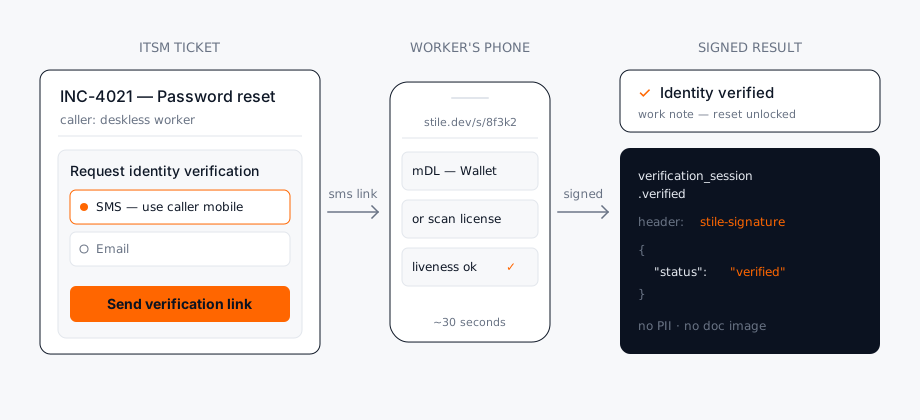
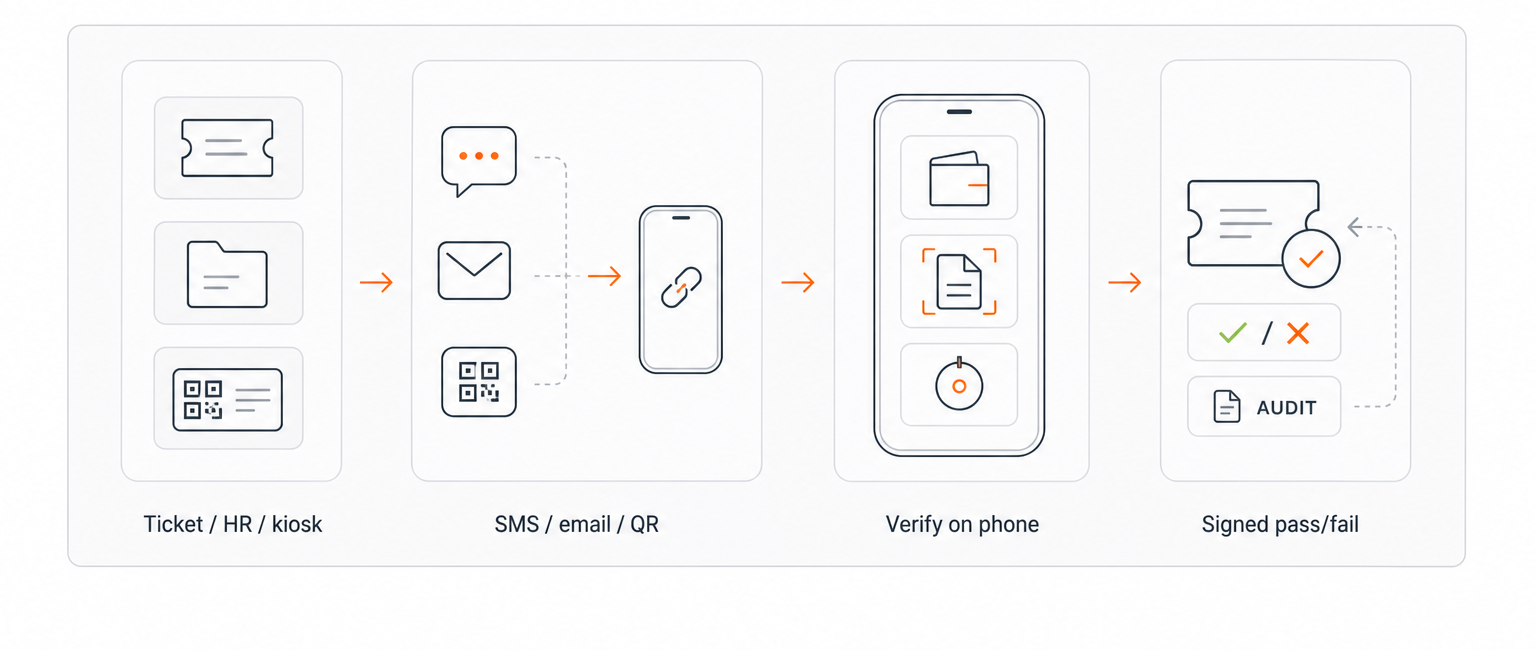
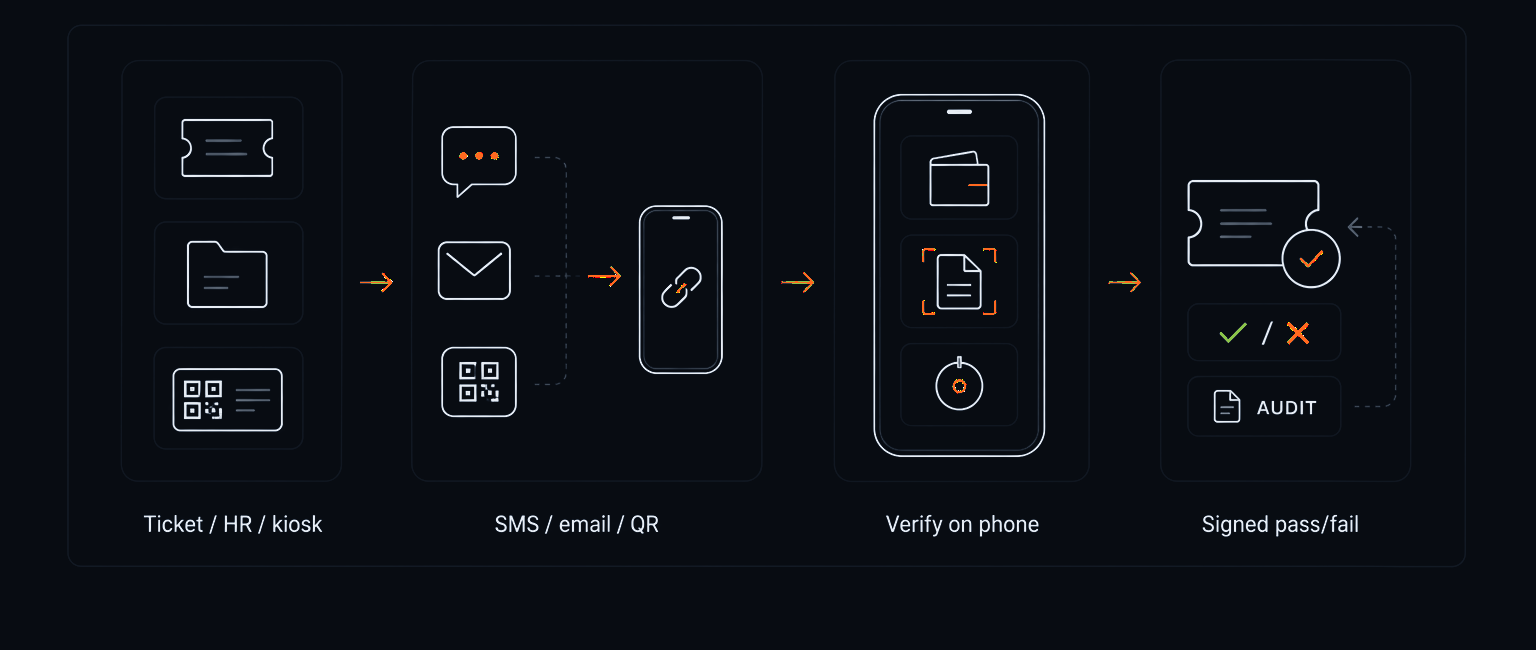
Trigger from a ServiceNow incident, an HR case, or any system of record: Stile sends the worker a link by SMS, email, or kiosk QR, the worker verifies on their own phone, and a signed result lands back on the ticket. Security review can see which human was verified for which access change — without your team storing a single document image.
How it works
Caller to verified in ~30 seconds.
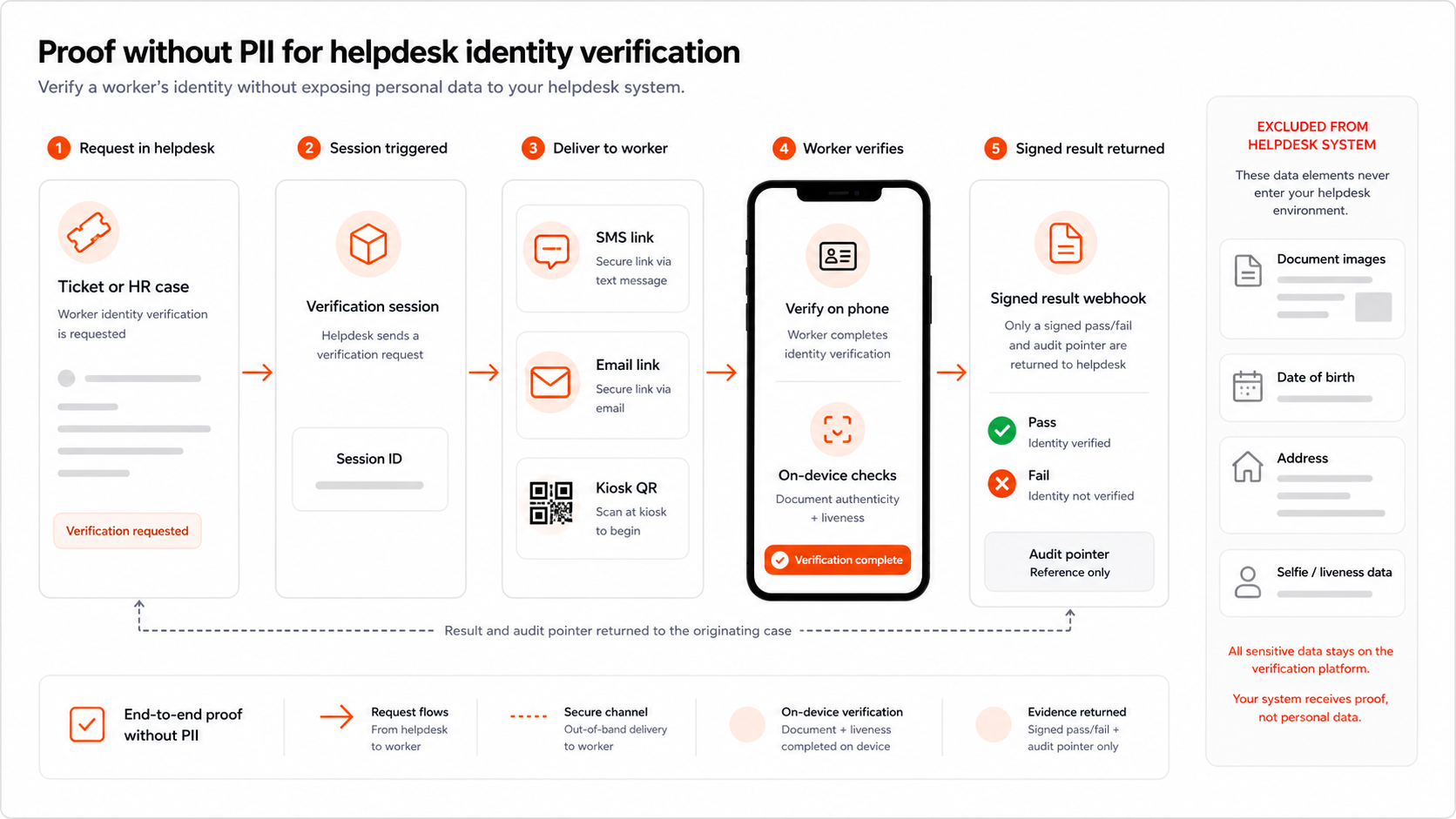
Only the signed yes/no enters your system. No raw PII. No retained images.
- Step 01
Trigger
An agent or workflow calls the API from a ticket, HR case, or record. Stile sends the worker a verification link by SMS, by email, or as a kiosk QR code.
- Step 02
Verify
The worker opens the link on their own phone: a mobile driver's license from their wallet, or a photo of a government ID, plus a liveness selfie.
- Step 03
Sign
Stile cryptographically signs the result. No raw PII crosses your wire.
- Step 04
Webhook
A signed assertion is delivered to your callback URL. The agent sees verified — never the document.
- Step 05
Decide
The reset unlocks, the case proceeds, or access is granted — based on the signed result. ~30 seconds end-to-end.
Outcome
Cheaper than the reset it replaces.
See the same signed pass/fail your ticket, kiosk, or HR case will receive.
Why Stile
Easy. Cheap. No PII. Effective.
What the check proves
Typical checks
Stile
The human, not the homework
Employee ID, voice, and security questions test knowledge. Documents plus liveness test the person.
knowledge only
document + liveness
Deskless coverage
Any mobile browser, no app install, kiosk QR fallback for shared devices.
corporate devices only
any phone
What enters your systems
Pass/fail and an audit pointer. No license image, no date of birth, no address.
PII lands in tickets
signed boolean
Cost per check
Priced to disappear next to an escalated reset or an on-site badge visit.
agent minutes
per completed check
The structural advantage
A verification costs less than the help-desk minutes it replaces — and far less than the breach it prevents. Pay per completed check; see /pricing for the schedule.
Methods
Six ways to answer one question.
Same signed result regardless of which credential the worker presents.
Mobile driver's license
ISO/IEC 18013-5 wallet credential, verified by signature, not a photo.
Trusted across regulated industries · Built on open standards
Integration surfaces
Trigger it from wherever the case already lives.
A verification session is one API call — the agent picks SMS, email, or kiosk QR right from the ticket. No marketplace app to install, no new console to learn.
- REST API — one POST to create the session, one signed webhook back.
- Node.js SDK — typed client, webhook signature verification built in.
- Hosted iframe — drop the verification UI into an internal tool with no build.
Where it fits
Four identity moments. One primitive.
IT, HR, and operations share the same question at different doors: is this the worker of record? Same API, four workflows.
| Identity moment | What Stile verifies | Outcome |
|---|---|---|
Moment 01 Password reset & MFA recovery | What Stile verifies The caller against the worker of record — triggered from a ServiceNow incident or any help-desk ticket. | Outcome Account recovery stops being the social-engineering front door. |
Moment 02 Onboarding, day one | What Stile verifies The new hire before credentials issue — a link in the welcome text, done before the first shift. | Outcome Accounts are provisioned to a verified human, not an inbox. |
Moment 03 Contractor & vendor access | What Stile verifies The third-party worker before system or site access — run from the vendor or Salesforce record. | Outcome A verified boundary for the workforce you don't badge. |
Moment 04 Kiosk & shared terminals | What Stile verifies The worker at a shared screen via QR code — employee hub, HR self-service, time clock. | Outcome Shared devices without shared identity. |
Pass/fail plus an audit pointer, delivered to your system by signed webhook. The agent never sees the license image, the date of birth, or any other document data — none of it enters the ticket.
Yes. ISO/IEC 18013-5 mDLs are accepted natively, with user consent and selective disclosure — the wallet releases a signed credential, not a document photo. Availability varies by state, so a physical-license scan plus liveness selfie is always available as the fallback path.
The link opens in any mobile browser — no app install — which covers most personal devices. For the remainder, a shared kiosk or supervisor tablet runs the same QR-code flow. Workers with no device access at all stay on your existing manual escalation path; Stile shrinks that queue rather than pretending it away.
Stile does not need to replace your ITSM or CRM. Your system creates a verification session by API, sends the worker a link by SMS or email, and receives a signed webhook when the check completes. The agent sees the result and audit pointer, not the document image.
It complements MFA. MFA authenticates a credential the worker already holds; Stile proves the human at enrollment and recovery — exactly the moments MFA can't cover because the credential is being issued or replaced.
Pricing is per completed check with volume bands; see the pricing page.
Help-desk social engineering works by convincing an agent to trust something that's easy to fake — an employee ID, a voice, an answer to a security question. Stile replaces that trust with a signed verification: the worker proves their identity with an mDL or document scan plus a liveness selfie, on a channel of their choosing (SMS link, email link, or kiosk QR), and the agent gets a pass/fail they can act on instead of a story they have to judge.
The ask
See it running on your workflow.
Bring a real ticket, HR case, or kiosk flow and we'll wire up a live verification session against it — SMS link, email link, or kiosk QR, whichever your workers already use. Signed pass/fail back to your system, no PII in the ticket, no marketplace app to install.